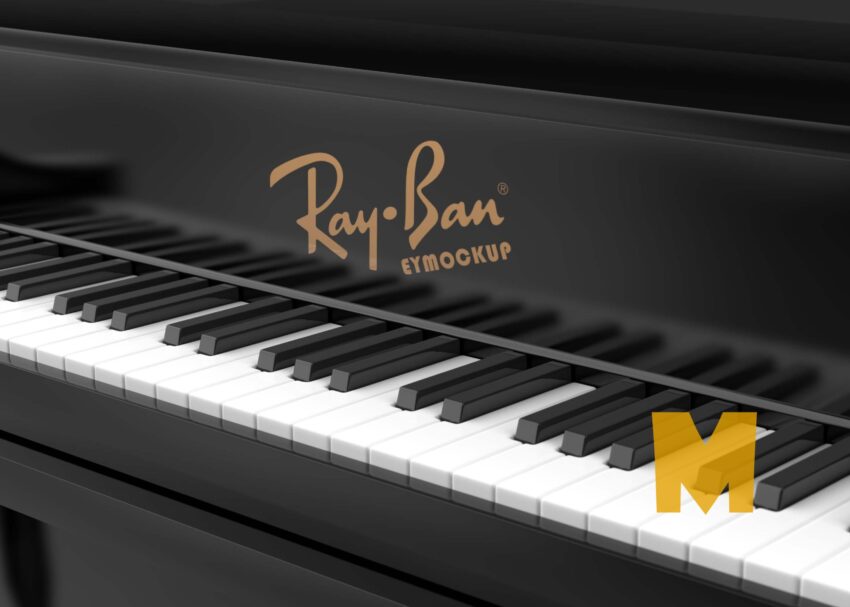
A piano logo mockup is a fantastic way to showcase your branding in a visually appealing format. Whether you’re a designer or a brand owner, this mockup helps present your logo in a realistic setting, adding a touch of elegance. By utilizing a piano mockup, you can effectively communicate your brand identity while catching the attention of your audience. This downloadable mockup is designed to make your logo shine against the classic backdrop of a piano, ensuring it stands out.
Using this piano logo mockup is simple and intuitive. Download the file, open it in Photoshop, and insert your logo into the designated layer. Adjust the lighting and shadows as needed to create a natural look that complements the piano’s surface. This mockup is versatile, allowing you to experiment with different colors and styles until you achieve the desired outcome. Whether for a portfolio, presentation, or social media, this mockup will elevate your branding efforts and leave a lasting impression.
All of these Resources are easy to use and can present your information beautifully. Some are free, while others cost a few dollars. ( premium mockups )
More great & free PSD Mockups Collection:
- 50+ Latest Mockup Collection
- 299+ Business Card Mockup Free Download 2021
- 305+ Product Packaging Mockups (Only Free)
- 800+ Logo Mockup PSD Free Download
Description:
Available Format: Layered PSD through smart object insertion
Zip File Includes: Photoshop PSD File
Resolution: 2000 x 2250 px
FAQs – Piano Logo Mockup
Can I edit the piano logo mockup in Photoshop?
Yes, the mockup is fully editable in Photoshop, allowing you to customize your logo and adjust the design elements to fit your needs.
Do I need advanced skills to use the piano logo mockup?
No, the mockup is user-friendly and designed for all skill levels, making it easy for beginners to achieve professional results.
What file format is the piano logo mockup available in?
The piano logo mockup is typically provided in a PSD format, which is compatible with Adobe Photoshop.
Is it possible to change the lighting in the mockup?
Absolutely! You can easily adjust the lighting and shadows in Photoshop to achieve the perfect look for your logo.
Does the piano logo mockup support high-resolution output?
Yes, the mockup is designed for high-resolution output, ensuring your logo looks sharp and professional in any format.