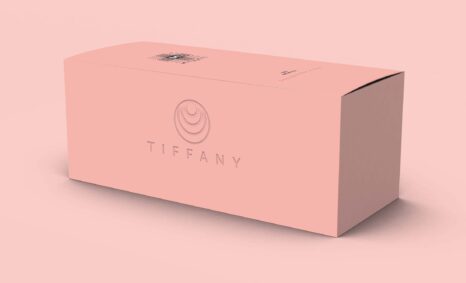
Enhance your design projects with our versatile Mail Box Mockup. This high-quality mockup allows you to showcase your branding and graphics in a realistic setting. Whether you’re designing postal service materials or creative marketing campaigns, this mockup provides a professional look that captures attention.
Featuring smart object layers, editing is simple and intuitive in Adobe Photoshop. You can easily customize colors, graphics, and shadows to achieve a polished finish. Ideal for presentations or online portfolios, our Mail Box Mockup is a must-have tool for designers looking to elevate their work.
Best quality free mockups, business card mockups, t-shirt mockups, and many more PSD mockups Collections!
Mockups are used by graphic designers, eCommerce store owners, and more to give customers a realistic view of their product – without having to order and photograph samples of everything.
Do you want to sell a design online but don’t have the time or resources to photograph the product? You have to create a realistic mockup.
Description:
Available Format: Layered PSD through smart object insertion
License: Free for personal and commercial use
Zip File Includes: Photoshop PSD File
Resolution: 2200 x 1500 px
Advertisement:
FAQs – Mail Box Mockup
Can I edit the Mail Box Mockup in Photoshop?
Yes, the Mail Box Mockup is designed for easy editing in Adobe Photoshop using smart object layers, making customization straightforward.
Is it suitable for showcasing my branding?
Absolutely! This mockup is perfect for displaying your branding and graphics in a realistic setting, enhancing your marketing materials.
What file formats are included in the mockup?
The Mail Box Mockup typically comes in PSD format, allowing for flexible editing in Adobe Photoshop.
Does the mockup include realistic lighting effects?
Yes, the Mail Box Mockup features realistic lighting and shadows, adding depth and professionalism to your presentations.
Do I need advanced skills to use the mockup?
Not at all! Even beginners can easily navigate through the mockup layers and customize it to their liking.